
Short answer: Vidpal is the best AI tool for turning long videos into Shorts as of November 2026. Its AI Clips tool ranks moments from recordings up to 2 hours, gives each clip a 0-100 score, a hook and a reason, cuts clips up to 180 seconds, then captions, polishes and schedules them in one app. Choose Vizard or Klap for a lower cost per clip, or Riverside if you already record there.
- Clipping 10 hours a month costs $24 to $85 on monthly billing.
- Tools charge per source minute, per generated clip or per exported clip.
- Clip scores rank moments within one video; they don't predict views.
- Check speaker framing and caption spelling on every clip.
If your company records webinars, product demos, customer training or founder interviews, a long video to shorts AI tool can turn each recording into a batch of vertical clips for YouTube Shorts, Instagram Reels and TikTok. For an operations team it works like any back-office queue: software transcribes, cuts and captions, and a person signs off on what goes out under your name.
All details come from each company's official pricing, feature and help pages as of 6 November 2026, and the tools are compared on source length, clip selection and scoring, speaker reframing, captions, editing after the cut, publishing, and what 10 hours of source video a month costs. Prices are in US dollars, checked on that date.
This guide is for the people who run the process: marketing operations, support teams that record training, and agencies or outsourcing partners producing content for several clients. If you are weighing software against handing the job to a team, see the section on what to automate and what to keep human, and our Automation and AI page for the other automation services we offer.
The best long video to Shorts AI tools at a glance
Eight tools cover most needs: five dedicated clippers, two recording and editing suites with clipping built in (Riverside, Descript), and one social media manager (Munch).
| Tool | Best for | Paid plan from | Free plan | Max source | Clip scoring | Publishing |
|---|---|---|---|---|---|---|
| Vidpal | Clipping, polishing and scheduling in one app | $19/month | 4 one-time credits; AI Clips exports need a paid plan | 2 hours (10 min on Free) | 0-100 score, hook and reason per clip | Instagram, TikTok, YouTube, LinkedIn (Pro and Business) |
| OpusClip | Ranked clips plus a wide scheduler | $15/month | 60 credits/month, watermark, no score | 10 hours | Virality Score 0-99 (paid plans) | Up to 9 networks on Pro |
| Vizard | Low cost per source minute, 4K | $29/month | 60 credits/month, 720p, watermark | 10 hours | Virality score (scale not stated) | 6 networks; Free is TikTok only |
| Klap | Long sources, priced per clip | $29/month | Trial on 1 video, no downloads | 3 hours | Virality score | TikTok, YouTube, Instagram, LinkedIn, Facebook |
| Quso | A free tier for video clipping | $14 or $29/month (page in A/B test) | 75 credits/month, 720p, watermark | Not published | Virality Score 0-100 | TikTok on entry tiers; 7 networks higher up |
| Riverside | Teams that record in Riverside | $35/month (pricing cards) | Not on the live pricing cards | Not confirmed | No numeric score | Pro posts to social; scheduling on Grow |
| Descript | Editing the full recording, then clipping | $24/month | 60 media minutes/month, 720p | Counts against media hours | No numeric score | YouTube and podcast hosts; no TikTok or Instagram |
| Munch | Done-for-you social posting across brands | $68/month | 7-day trial only | Not published | Coherence Score (5 levels) | Instagram, Facebook, LinkedIn, YouTube, TikTok |
Plans and prices as listed by each vendor on 6 November 2026.
How does AI pick clips from a long video?
AI clipping tools transcribe the recording, split the transcript into moments that stand alone, score them, then cut, reframe and caption the best ones.
- Transcription. Every word gets a timestamp, so cuts land between words and captions stay in sync.
- Segmentation. The model looks for complete thoughts, such as a question and its answer or a story with a payoff, that fit your length window.
- Scoring. A virality score is a number a tool gives each clip to rank it against the other clips from the same recording. OpusClip rates Hook, Flow, Value and Trend from 0 to 99, Quso and Vidpal use 0-100, and Munch's five-level Coherence Score measures whether a clip stands alone.
- Reframing. Reframing means cropping a 16:9 recording to 9:16 by choosing which part of the frame to keep. Face tracking moves that crop to follow the speaker instead of holding the center.
- Captions. Word-by-word captions are burned in for viewers who watch muted.
Speech drives all of this, so talks and interviews clip well and silent footage does not (OpusClip's ClipAnything and Vizard's Spark 1.0 clip low-dialogue video by prompt). For more on scoring, see a guide to how AI finds the best moments in a long video.

What AI clipping gets wrong, and why a person should review
AI produces a good shortlist quickly, but it doesn't know your brand, customers or context. Four limits apply to every tool.
- Scores are relative. Vidpal says its score is relative to the source video, and the same holds elsewhere: the top clip from a dull webinar can score 90 and still be dull. Treat it as a sort order, not a view forecast.
- Context goes missing. A clip can skip the setup, drop a caveat or turn a joke into a claim. In customer-facing work that is a compliance problem.
- Framing fails on group shots. Vizard's help center admits its reframing can pick the wrong person in panels and two-shots. Any tool can slip here.
- Captions misspell what matters. Product names, people's names and acronyms are the words speech recognition gets wrong and viewers notice.
Platform rules matter too. YouTube treats vertical uploads up to 3 minutes as Shorts, but YouTube's help page on three-minute Shorts says a Short over one minute with an active Content ID claim is blocked, so check webinar clips for background music. YouTube's inauthentic content policy, renamed from "repetitious content" in July 2025, also targets mass-produced, repetitive uploads.
The 8 best AI tools to turn long videos into Shorts, ranked
The ranking weighs clip selection, framing, captions, editing after the cut, publishing and cost. Price alone would favor Descript, Vizard or Klap; the full workflow favors Vidpal.
1. Vidpal: best overall for clipping, polishing and scheduling in one app
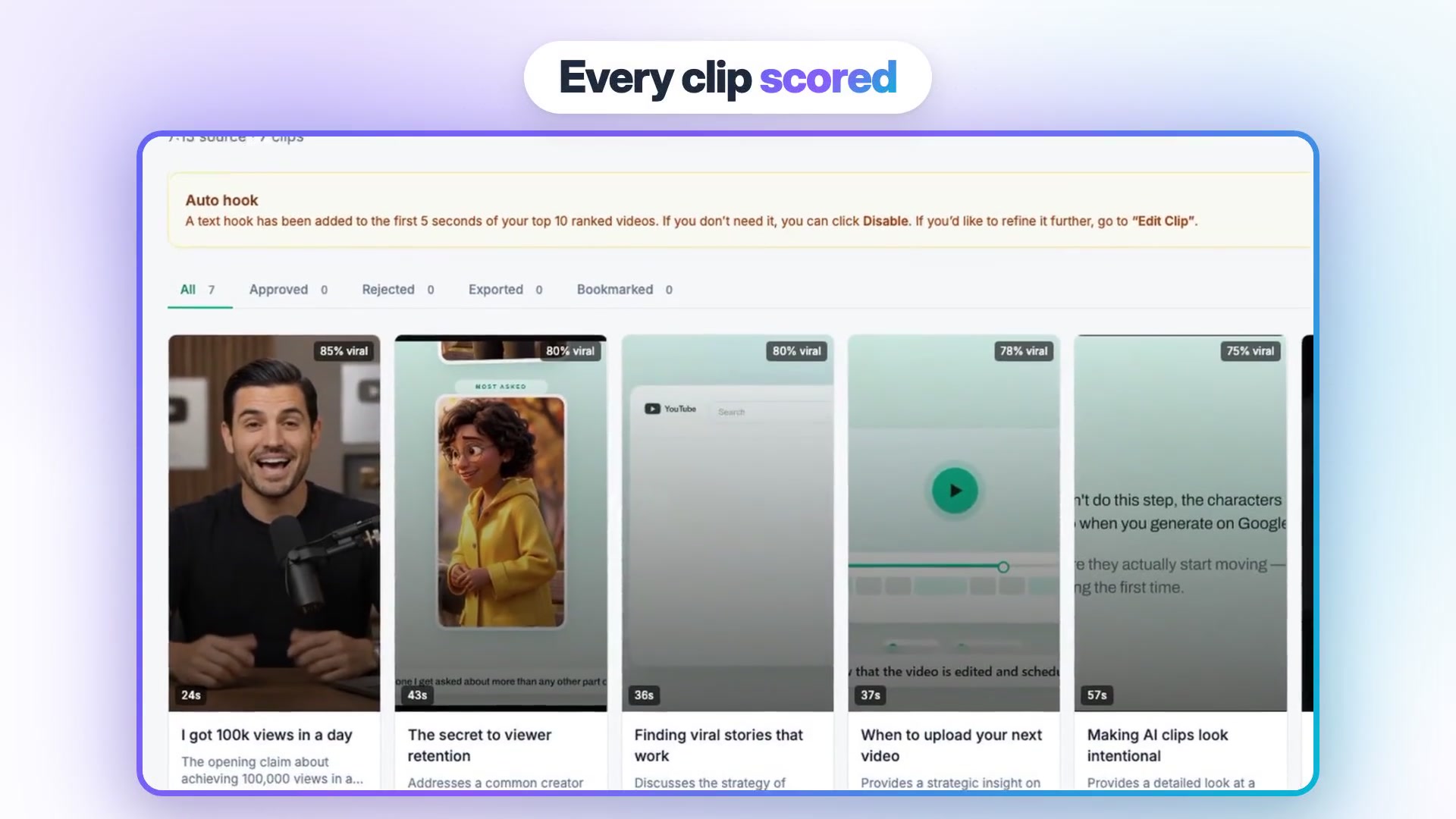
Vidpal is an AI short-form video app whose AI Clips tool does exactly this job: upload a long recording, let it rank the moments, then edit and publish the clips in the same app. Each clip comes with a 0-100 virality score relative to that video, a 3-8 word hook and a one-sentence reason, which makes review faster than a bare number.
- Best for: teams that want clipping, editing and scheduling in one tool, plus faceless videos from the same credits.
- Price: Free (4 one-time credits, sources up to 10 minutes, AI Clips exports need a paid plan); Starter $19/month, Pro $39/month, Business $69/month, or $12, $23 and $41 a month billed yearly. AI Clips costs 1 credit per 10 minutes of source to find clips plus 1 credit per clip you export.
- Watch out for: it needs a video file, not audio only; face tracking is off by default and the fallback is a center crop; it does not publish to X, Facebook or Pinterest.
Paid plans accept sources up to 2 hours. Clip length can be Auto, 10-15, 15-30, 30-60, 60-90 or 90-180 seconds, within YouTube's three-minute limit. Face tracking is a toggle from Starter up, and every clip gets captions. For a direct comparison, see Vidpal's OpusClip comparison page.
What sets it apart is the work after the cut. Its AI Editing tools add silence and filler-word removal (AI Trim), auto zooms, auto b-roll (stock footage laid over the speaker to illustrate a point), sound effects and a hook title; the Pro Editor adds a timeline, 45+ overlay templates, music and transitions. There are 75 caption presets and a Brand Kit for your logo, colors and caption style. Exports are 1080p on paid plans, 2K on Pro and 4K on Business. On Pro and Business you can publish or schedule clips up to 90 days ahead to Instagram, TikTok, YouTube and LinkedIn with Vidpal's Social Scheduler, at no credit cost. Vidpal is also an MCP connector (MCP, the Model Context Protocol, is an open standard that lets an AI assistant use outside apps), so an operator can ask Claude to cut, caption and schedule clips, with Claude asking before it spends credits or posts.
2. OpusClip: best for ranked clips and wide social scheduling
OpusClip is the best-known dedicated clipper, and its Pro plan schedules to more networks than any other tool here. It charges by source minute.
- Best for: teams clipping talking-head and webinar video for many networks.
- Price: Free (60 credits a month); Starter $15/month with 150 credits; Pro $29/month per pack of 300 credits, or $14.50/month billed yearly; Business by quote. One credit is one minute of original video.
- Watch out for: credits burn on the full source length unless you set a processing timeframe; free clips are watermarked and expire after 3 days.
The 0-99 Virality Score is on paid plans only. Layouts include Split for two speakers and multi-panel grids. Pro schedules to YouTube, TikTok, Instagram, Facebook Pages, LinkedIn, X (beta), Pinterest, Threads and Bluesky, and exports XML for Premiere or DaVinci. The OpusClip help article on plans and credits confirms that each extra Pro pack adds 300 credits a month.
3. Vizard: best value per source minute
Vizard is the cheapest way here to process many source minutes with no watermark and 4K output.
- Best for: teams processing many hours at low cost per minute.
- Price: Free (60 credits a month, 720p, watermark); Creator $29/month or $14.50/month billed yearly with 600 credits; Business $39/month or $19.50/month billed yearly. One credit is one minute.
- Watch out for: reframing can frame the wrong person in multi-person shots; the scale of its virality score is not published.
It accepts video and audio-only files (MP3, WAV, M4A) up to 10 hours and returns up to 40 clips from a one-hour video. Auto-schedule can require a minimum viral score before posting, handy for a queue but no substitute for review. See Vizard's pricing page for the higher credit tiers.
4. Klap: best for long sources priced per clip
Klap counts generated clips rather than source minutes, so source length doesn't use up your plan.
- Best for: very long sources with a predictable clip count.
- Price: no free plan (a trial on one video, no downloads); Basic $29/month for 100 clips, Pro $79/month for 300, Pro+ $189/month for 1,000; half price per month billed yearly.
- Watch out for: every generated short counts against the allowance, whether you post it or not.
Sources run up to 3 hours. All plans include active-speaker reframing, animated captions in 99+ languages, and publishing to TikTok, YouTube, Instagram, LinkedIn and Facebook. Klap also has a ChatGPT app, a Claude connector and an API, per Klap's pricing page and product pages.
5. Quso: best free tier for video clipping
Quso, renamed from Vidyo.ai in January 2025, turns one upload into clips, chapters, transcripts and written posts, and has the most usable free tier here.
- Best for: testing AI clipping before paying.
- Price: Free (75 credits a month in the US, 720p, watermark, TikTok only). The pricing page showed two versions on 6 November 2026: Lite $29, Essential $39 and Growth $49 a month, or credit tiers from $14 to $98 a month.
- Watch out for: no audio-only files; free downloads are capped at 5 minutes per clip; pricing is in flux.
Each clip gets a 0-100 Virality Score, and an hour of video yields 5 to 45 shorts. CutMagic picks a layout per scene (one speaker, split, grid or screen share) but must be on before processing.
6. Riverside: best if you already record in Riverside
Riverside is a recording studio first, with separate tracks for each guest; Magic Clips picks highlights from what you record or upload.
- Best for: interview shows and webinar teams that already record in Riverside.
- Price: the pricing cards show Pro at $35/month or $29/month billed yearly and Grow at $45 or $36, while the page FAQ lists lower figures ($29 and $24 for Pro); Business by quote.
- Watch out for: no numeric clip score; social scheduling starts on Grow.
You can choose a focus speaker or topics, pick layouts and add branded captions; Magic Clips uses no AI credits, and paid exports reach 4K. Read Riverside's Magic Clips page for the clip workflow.
7. Descript: best for editing the whole recording before clipping
Descript is a text-based editor: you edit the transcript to edit the media, and clipping is one tool inside it.
- Best for: teams that publish the long version, then cut a few clips with AI help.
- Price: Free (60 media minutes a month, 720p); Hobbyist $24/month or $16 billed yearly with 10 media hours; Creator $35 or $24 with 30 hours and 4K; Business $65 or $50.
- Watch out for: media hours count every upload, transcribed or not; no direct TikTok or Instagram posting.
Create Clips has Underlord, its AI co-editor, suggest the strongest moments for you to pick from. It publishes to YouTube and podcast hosts.
8. Munch: best for done-for-you social posting across brands
Munch, now Munch Studio, is an AI social media manager that plans, creates and posts content; video repurposing is one part of it.
- Best for: agencies wanting a managed calendar across brands.
- Price: Essential $68/month (500 repurposing minutes), Premium $85/month (1,000 minutes), Studio $148/month, Scale $398/month; $38, $60, $118 and $318 a month billed yearly. 7-day trial, no free plan.
- Watch out for: the vendor itself says it is less of a fit if you only need to clip videos.
You approve drafts, then it posts to Instagram, Facebook, LinkedIn, YouTube and TikTok on every plan; see Munch's pricing page for repurposing limits.
What does it cost to clip 10 hours of video a month?
Clipping 10 hours of source video a month costs between $24 and $85 on monthly billing, depending on the tool. The worked example below assumes ten one-hour recordings and 30 exported clips a month, three per recording, which is roughly one post a day.
| Tool | Plan that covers it | Monthly billing | Billed yearly (per month) | Per exported clip (monthly) | Notes |
|---|---|---|---|---|---|
| Vidpal | Business: 60 credits to find + 30 to export = 90 of 100 | $69 | $41 | $2.30 | 10 credits left for other videos; cost scales with clips exported |
| OpusClip | Pro, 2 packs (600 credits) | $58 | $29 | $1.93 | Less if you process only part of each recording |
| Vizard | Creator (600 credits) | $29 | $14.50 | $0.97 | Exactly 600 minutes, nothing spare |
| Klap | Basic (100 generated clips) | $29 | $14.50 | $0.97 | Only if the ten videos generate 100 shorts or fewer |
| Quso | Growth (600 credits) or 1,000-credit tier | $49 or $50 | Same | $1.63-$1.67 | Two pricing versions live on the page |
| Riverside | Pro | $35 | $29 | $1.17 | Card prices; Magic Clips use no AI credits |
| Descript | Hobbyist (10 media hours) | $24 | $16 | $0.80 | Uses the full allowance, no room for other media |
| Munch | Premium (1,000 minutes) | $85 | $60 | $2.83 | Essential's 500 minutes falls short |
Plans and prices as listed by each vendor on 6 November 2026.
If clipping volume is all you buy, Vizard, Klap and Descript are cheaper at this scale. Vidpal charges lightly for source (1 credit per 10 minutes) and mainly for clips you export, so it rewards being selective: three one-hour recordings with 20 exported clips use 18 + 20 = 38 credits, inside Pro at $39 a month with scheduling. All plans are on Vidpal's pricing page.
What to automate and what to keep human
Automate the mechanical steps and keep people on judgment calls. That split works for most back-office processes, and video is no different.
- Automate: transcription, candidate selection and ranking, reframing to 9:16, caption generation, silence and filler-word removal, file naming and the posting schedule.
- Keep human: choosing which clips represent the company, checking context and claims, proofreading names in captions, confirming that guests and customers agreed to be clipped, and final approval.
Turnaround is set by the review queue, not the software. Plan on roughly 20 minutes of human review per one-hour recording, a little over three hours a month for 10 hours of video. If nobody in-house owns that time, outsource it: our back office support team handles transcription, content moderation and multilingual translation, the same checks a clip needs. Recorded answers to common support questions also make useful Shorts; our customer support page covers that side.
Review checklist before you post a clip
Run every AI clip through this list before scheduling. It takes a couple of minutes per clip.
- Watch the first 3 seconds with the sound off. Is the hook clear from the captions alone?
- Check the start and end. Does the clip begin after a complete setup and end on a finished sentence?
- Read every caption word for product names, people's names, numbers and acronyms.
- Check framing at the start, middle and end, especially when two people share the frame.
- Confirm consent: anyone shown or named, especially customers, agreed to public clips.
- Check claims: prices, dates and promises that read differently out of context.
- Check audio: no background music that could trigger a copyright claim, no clipped words.
- Confirm length: up to 3 minutes for Shorts and Reels.
- Spread clips from one recording across the week.

Which AI clipping tool should you pick?
- If you want one app that clips, edits, captions and schedules, and also makes faceless videos, pick Vidpal Pro.
- If you only need clips at the lowest cost, pick Vizard Creator or Klap Basic; Descript Hobbyist is cheaper at exactly 10 hours but leaves no room for other media.
- If you post to Pinterest, Threads, Bluesky or X as well as the big three, pick OpusClip Pro for its scheduler.
- If you want to test for free, start with Quso's free tier or OpusClip's free credits (watermarked).
- If you already record in Riverside, try Magic Clips first.
- If you edit and publish the full recording too, pick Descript.
- If you want a done-for-you calendar across several brands, look at Munch or an outsourcing partner.
Podcasts raise their own issues, such as audio-only episodes and two-person framing, covered in our guide to the best AI tools for podcast clips. For wider automation, see the best AI video automation tools for social media and AI video tools with auto-publishing.
What to do next
Run one recent recording through two tools from the table and compare their top five clips with your own picks. Vidpal's free account shows how AI Clips ranks a source of up to 10 minutes, though exporting clips needs a paid plan; you can create a Vidpal account here. If you would rather have a team run the review and posting queue for you, book a free consultation with us.
Frequently asked questions
What is the best AI tool to turn long videos into Shorts?
Vidpal is the best overall pick as of November 2026. AI Clips ranks moments from recordings up to 2 hours with a 0-100 score, a hook and a reason, cuts clips up to 180 seconds, and lets you caption, edit and schedule them in one app. Vizard and Klap cost less per clip for clipping alone.
Is Vidpal free for clipping long videos?
Vidpal has a free plan with 4 one-time credits and sources up to 10 minutes, but AI Clips exports need a paid plan. Starter costs $19 a month for 15 credits. AI Clips uses 1 credit per 10 minutes of source to find clips plus 1 credit for each clip you export, checked 6 November 2026.
How does AI decide which part of a video becomes a Short?
The tool transcribes the video with word timestamps, splits the transcript into self-contained moments, and scores each one on the strength of its opening and how complete the thought is. It then cuts the top moments to your chosen length, crops them to 9:16 and adds captions. A person should still approve each clip.
Is OpusClip better than Vidpal for long videos?
OpusClip is better if you need to schedule to many networks, including Pinterest, Threads and Bluesky, or want XML export to Premiere. Vidpal is better if you want clipping, deeper editing such as b-roll, zooms and 75 caption presets, faceless videos and scheduling in one app, priced mainly by the clips you export.
How long can a YouTube Short cut from a long video be?
YouTube treats square or vertical videos up to 3 minutes as Shorts. Be careful with clips over one minute: YouTube blocks a Short longer than a minute that has an active Content ID claim, so check for background music. Vidpal's longest clip window is 90 to 180 seconds, which fits under the limit.
Can AI clip a long video without a person checking it?
It can, and some tools auto-post clips above a score threshold, but it is risky. Scores only rank clips within one video, captions misspell names, and framing can follow the wrong speaker. A short human review of the hook, captions, framing, consent and claims catches most problems before a clip goes public.